How It Works
Credential management, privileged sessions, and security insight—connected through shared policy and evidence.
The Platform at a Glance
Section titled “The Platform at a Glance”Each component has a focused role. Together, they connect the request, the work, and its outcome. To watch the work move between them, play a flow on the documentation home.
Authorization · policy · canonical state
Accepts results and governs audit intakeDeterministic posture
State, findings & evidenceOutbound only · no listenerCredential management
Admitted jobs / resultsOutbound only · no listenerPrivileged sessions
Session authority & evidencePrivate listener · TCP 8090Web → ConnectProtected WSS · 8090
Live session traffic bypasses Core. Connect checks authority with Core.Core → each storePostgreSQL TLS · 5432
Protected operational state
Audit & historical records
Engine → targetsApproved management protocols
Connect → targetsApproved session protocols
Target-defined ports; allow only protocols required by the selected profile or session.The same picture, live in the console
Section titled “The same picture, live in the console”System → Health → Map draws your actual deployment from what each service reports: every component, every protected link, its protocol and port, and the certificate authority that guards it.
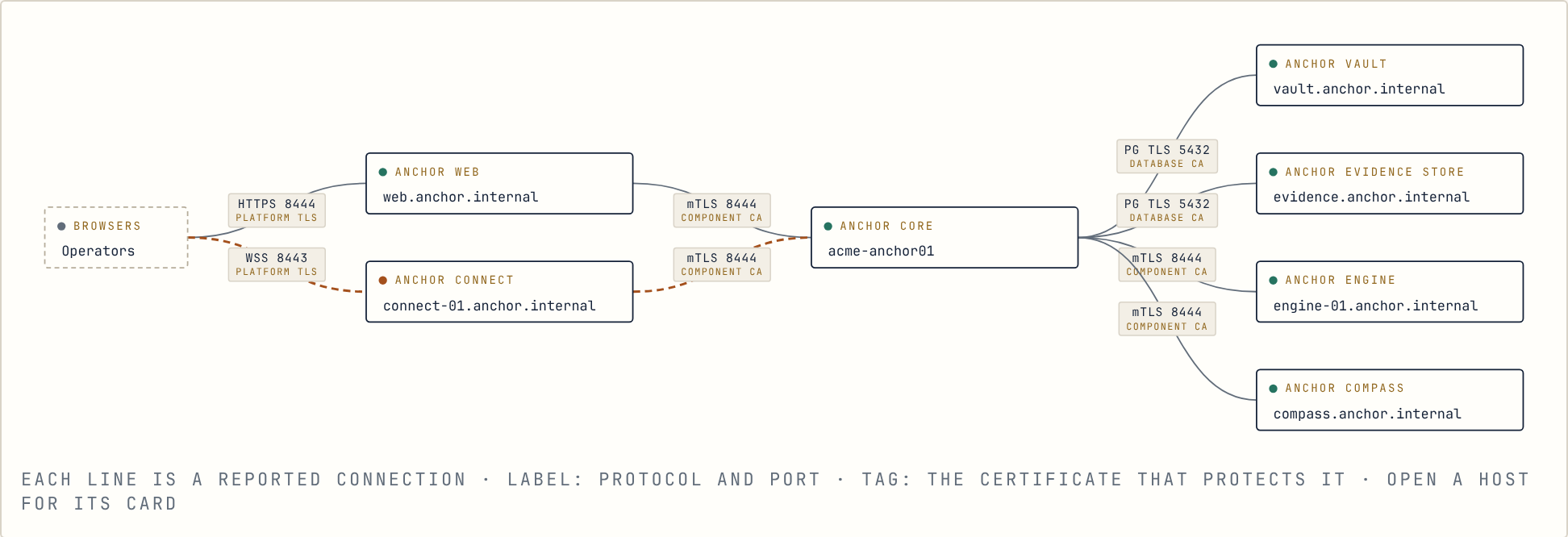
One path for all credential work
Section titled “One path for all credential work”Whether someone clicks Rotate or a schedule fires at night, the work takes the same path: Core checks who asked and under which Policy, records the request as a job, and Engine carries it out. Core accepts the result only when it is complete, updates the account, and writes the audit record in the same step. Sessions take a separate path through Connect, so credential changes and interactive access never share a channel.
Component Responsibilities
Section titled “Component Responsibilities”Open a component to explore its role and how it connects with the rest of Anchor.
Your WorkspaceWebA shared console for administration and access.
Web brings the platform into a consistent interface. Your team can work with resources, accounts, policy, and activity without piecing together separate operating views.
Connected WithCore · Connect
Policy & AuthorityCoreConnects requests, decisions, and results.
Core checks authorization, applies policy, and accepts the results of work. This gives the other components a shared foundation for governed operations and connected evidence.
Connected WithWeb · Engine · Connect · Compass · Vault · Evidence
Credential OperationsEngineHandles credential rotation and verification.
Engine performs credential-management jobs through the appropriate profiles and integrations. Manual and scheduled work follow the same controlled path, with results returned to Core.
Connected WithCore · Managed Systems
Privileged SessionsConnectCarries interactive privileged sessions.
Connect provides the session path to target systems and checks session authority with Core. Credential-management work stays with Engine, keeping the two responsibilities clear.
Connected WithWeb · Core · Target Systems
Posture & RatingsCompassMakes security posture easier to understand.
Compass uses authoritative state and evidence to produce findings and ratings. It connects the technical picture to affected resources, helping your team see what needs attention and why.
Connected WithCore · Evidence · Insights
Protected RecordsVaultHolds credentials, encrypted, and Anchor’s operational state.
Vault is Anchor’s own database. Credentials are encrypted before they reach it, and only Core connects to it. It can stream to a disaster-recovery copy.
Connected WithCore
History & AccountabilityEvidenceKeeps actions connected to their outcomes.
Audit, event, and session history provides a record of activity across the platform. Components report through Core so the evidence stays connected to the work that produced it.
Connected WithCore · Activity · Compass
Host OperationsHost AgentRuns on every Anchor host.
The agent reports its host’s state and carries out host operations, such as a database switchover or an upgrade, only after Core has signed them and an administrator approved them. It has no login shell and accepts no inbound connections.
Connected WithCore
Advisory IntelligenceInsightsAdds context to findings and evidence.
Insights helps explain what deserves attention and what to investigate next. It is an advisory capability, not another deployment node; your team retains authority over changes.
Connected WithCompass · Curated Evidence